


Expense IQ Money Manager
3.22.81K Reviews
App Specs
- Version
- 2.3.2
- Updated On
- License
- Free
- Downloads
- 1,000,000+
- Developer
- Handy Apps
- Categories
- Finance
- Platform
- Android
Screenshots
 Analysis by AppCompare
I tend to judge a money manager by what happens after the first week, not by how attractive the opening screen looks. Expense IQ Money Manager is built for the less exciting but more useful part of personal finance: recording spending, planning a budget, and remembering bills before they slip through the cracks. I found it most appealing as a practical Android finance app for someone who wants one place to keep an eye on everyday money without turning the process into a full accounting project.
The app comes from Handy Apps and is free to install, with optional in-app purchases ranging from $3.49 to $124.99 per item. Its age rating is Everyone, and it has been available since May 14, 2014. That long presence matters to me because a finance tool needs to feel familiar and established enough to become part of a routine, even though the current experience should still be judged on how comfortably it handles today’s habits.
How Expense IQ feels during everyday use
I find Expense IQ most useful when I decide in advance what I want to track, rather than trying to turn every purchase into a detailed financial record. In this section, I’ll look at how its everyday workflow can help make spending visible, while keeping expectations realistic about the attention a manual money manager asks of me. That practical routine also leads to a closer look at what I can actually verify about trust and control.
Quick enough for the small decisions that matter
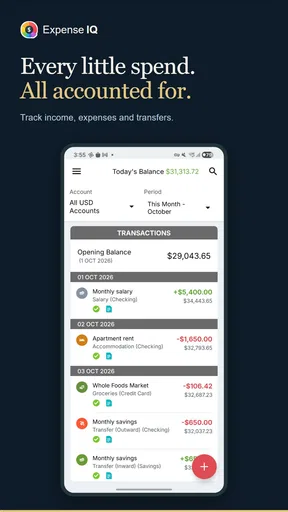
For this kind of app, perceived speed is less about dramatic animation and more about whether entering a coffee, bus fare, grocery purchase, or subscription feels like a chore. Expense IQ works best when I treat it as a quick logbook rather than a place to study every transaction in detail. The value comes from keeping the capture step short enough that I do not postpone it until the end of the week.
That distinction is important. A money manager can have excellent reports and still fail if recording a purchase feels too demanding. My preferred workflow is to enter the amount while the purchase is still fresh, choose the appropriate category, and move on. When I keep that habit, the app becomes useful without requiring a long evening session to reconstruct where my money went.
The interface is aimed at people who want expense tracking and budget planning together, so there is more to it than a simple calculator. The extra structure is helpful once I have created sensible categories and recurring obligations. It can also make the first setup feel heavier than using a basic notes app or a spreadsheet with one running total.
The most important performance advantage is practical speed: the app is valuable when it reduces the time between spending money and recording it. If you expect elaborate financial analysis to appear instantly without any setup from you, the experience may feel less effortless.
Worth Reading Before You Choose

EA SPORTS FC Mobile 26 Is a Bigger Football Game, but It Takes Time

Flipboard Shows What News Apps Must Do Beyond the Feed

Switching to Android Auto Means Rethinking Your Driving Routine

Google Calendar Makes a Crowded Week Easier to Manage

Ludo King Makes the Most of the Minutes Between Plans

Baby Panda World Brings Quick Play to Modern Phones, but Its Game Library Feels Busy
What happens when the records start piling up
Heavy use for Expense IQ does not necessarily mean a single dramatic task. It is more likely to mean months of transactions, several budget categories, repeated bills, and frequent checks of spending patterns. That is where a finance app earns its place, because the information becomes more useful only when it reflects real behavior over time.
I would approach that buildup in stages. First, I would create only the categories I genuinely use. Then I would add regular bills and a realistic budget rather than trying to model every possible financial situation at once. This keeps the app easier to scan and avoids confusing a detailed system with an accurate one.
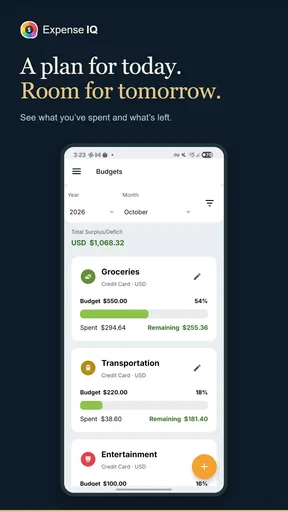
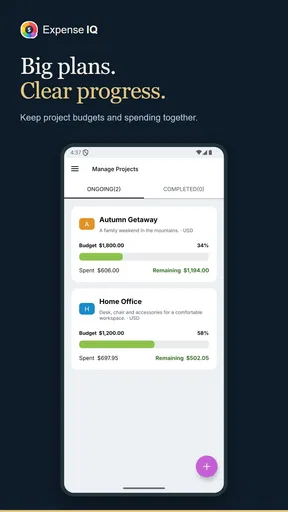
A useful but easy-to-miss workflow is to use budget planning as a warning system rather than a strict command. If a category is consistently exceeded, the answer may be that the limit was unrealistic, not that every purchase was irresponsible. Reviewing the pattern at the end of a pay period gives better information than reacting to one unusually expensive day.
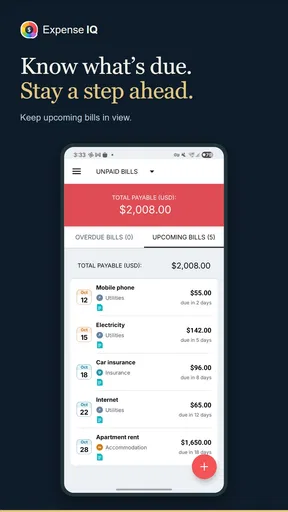
Bill reminders are especially useful in a busy month. I would use them for obligations that are easy to overlook, such as annual renewals or less frequent payments, rather than filling the reminder list with every tiny recurring purchase. That keeps the alerts meaningful. A reminder system loses its value when everything is marked urgent.
A realistic week with the app
Imagine a user who gets paid near the beginning of the month. On the first day, I would enter the expected bills, set broad spending limits for food, transport, and personal purchases, and leave some room for expenses that are difficult to predict. During the week, I would record purchases shortly after making them. On the weekend, I would look at the categories that moved the most and decide whether the next week needs a change.
That routine shows where the app is stronger than a plain note on a phone. A note can store amounts, but it does not naturally turn them into a budget habit or a reminder routine. At the same time, the app does not remove the need for discipline. If I forget to record cash spending or casually assign purchases to the wrong category, the resulting picture can look organized while still being inaccurate.
For a household, the same workflow can become more complicated. A shared budget needs consistent category names and an agreed rule about who records what. Expense IQ can be useful as a central record, but I would not assume that installing it automatically solves the communication problem between two people. The app can organize entries; it cannot decide whether a purchase belongs under groceries, dining, transport, or something else.
Reliability is also about recovering from imperfect habits
In a finance app, reliability means more than opening without a problem. It also means being able to return after missing several days, correct an entry, and continue without abandoning the whole system. Expense IQ makes the most sense for users who accept that their records will occasionally be incomplete and want to repair the routine instead of starting from zero.
My advice is to make corrections as soon as I notice them. A forgotten purchase is easier to place while I still remember the date and purpose. If I wait until the end of the month, I may remember the total but not the category, which weakens the budget analysis. This is a general habit, but the app’s combination of tracking and planning makes the consequence more visible.
There is also a useful recovery strategy for people who are starting late: begin with current spending and recurring bills, then add older information only if it will change a decision. Rebuilding every historical transaction can create so much friction that the user gives up before the app becomes useful. A clean, current starting point is often better than an ambitious but unfinished archive.
I would also be careful when editing a transaction that affects a budget. A correction to the amount or category can change the meaning of the summary, so I would review the relevant budget after making a substantial change. That small check helps distinguish a real improvement in spending from a simple data-entry correction.
Where stability expectations should stay realistic
Expense IQ has a 3.2 average from around twenty-three thousand ratings, alongside roughly 2.8 thousand written reviews. I read that as a sign to keep expectations balanced rather than treating the app as universally smooth. A rating at that level suggests that the experience works well for some people but may involve friction for others, especially when their preferred workflow does not match the app’s structure.
I would not choose it solely because it has passed the test of time, and I would not dismiss it solely because the average rating is modest. Finance apps are unusually personal: one user wants manual control, another expects automation, and a third mainly needs reminders. The same design choice can feel reassuring to one person and inconvenient to another.
The app has more than one million installs, which indicates that it has reached a substantial audience. That does not guarantee that it will fit my phone, my habits, or my tolerance for manual entry, but it does make it easier to view the product as a serious personal finance tool rather than a temporary experiment.
Device limits and what they mean in practice
The current version is 2.3.2, and the minimum operating system is Android 4.4. That broad compatibility is useful if I am using an older Android phone or keeping a secondary device for basic financial tasks. It also means that people should not expect the app’s requirements alone to tell the whole story about how modern or polished it will feel on every handset.
On an older device, I would keep the workflow simple: enter purchases, review the key budget areas, and avoid turning every session into a long reporting exercise. A phone with limited storage or modest memory can make any app feel less comfortable when many other applications are active. I would judge the experience by the response during the tasks I actually need, not by assumptions based only on the operating-system requirement.
Resource demands are particularly relevant for an app that is supposed to support a daily habit. If opening it feels inconvenient, I am less likely to record small purchases. That is why I prefer a lightweight routine with a few meaningful categories over a highly detailed setup that forces me to make too many choices every time.
Users who want a finance tool that automatically connects every account, imports every transaction, and handles complex financial planning should compare this app carefully with services designed around automation. Expense IQ is better suited to a person who wants to remain involved in the recording and organization of their money. That manual control can be a strength, but it is also the main trade-off.
Three habits that make the app more useful
First, I would separate fixed commitments from flexible spending in a way that reflects real decisions. Bills should not be mixed into one vague category with occasional purchases, because that makes it harder to see what can actually be changed. A clear structure lets the budget answer a useful question: which costs are already committed, and which ones can I adjust?
Second, I would create a small “review” habit for unusual purchases. Instead of inventing a new category every time something does not fit perfectly, I would place it in the closest sensible category and revisit the pattern later. This prevents the category list from becoming cluttered and makes long-term comparisons easier.
Third, I would use reminders selectively and check them against real payment habits. A reminder that arrives too early may be ignored; one that arrives too late is not helpful. The best setup is not the one with the most alerts, but the one that catches the payments I am genuinely likely to forget.
These approaches also reveal a trade-off that is easy to miss in a short store summary: the app can encourage better financial awareness, but only if I spend a little time designing the system around my life. It is not a magic view of my finances. It is a framework that becomes more accurate as my entries become more consistent.
Who should use it, and who should look elsewhere?
I would recommend Expense IQ to someone who wants a free starting point for manual expense tracking, budget planning, and bill reminders in one place. It is particularly suitable for a person who has tried keeping notes or a spreadsheet but wants categories and a clearer routine. It can also suit users with older Android phones because the minimum operating system reaches back to Android 4.4.
I would be more cautious if I disliked entering transactions myself. The app may feel like extra work compared with a bank application that automatically displays account activity. That alternative can be more convenient for monitoring card payments, although it may not offer the same focused budgeting routine or the same separation between everyday tracking and reminders.
A spreadsheet remains a better choice for someone who wants complete control over formulas, custom reports, or unusual household accounting. A dedicated banking app may be preferable for users who care most about live account balances. Expense IQ sits between those options: more structured than notes, less open-ended than a spreadsheet, and more manually managed than an account-connected service.
The optional purchases also deserve attention before committing to a long-term workflow. The app is free to use as an entry point, but the listed purchase range extends from $3.49 to $124.99 per item. I would begin with the free experience and decide whether its organization genuinely fits my routine before paying for anything extra.
My performance verdict after weighing the trade-offs
My overall view is that Expense IQ Money Manager is a useful, hands-on finance app rather than a completely effortless financial dashboard. Its best qualities appear when I use it consistently: quick expense capture, deliberate budget categories, and reminders for payments that could otherwise disappear into a busy month. The app rewards a simple routine more than an elaborate setup.
Perceived speed should be good enough for ordinary entries and short reviews, but I would not choose it on the promise of advanced automation or a zero-maintenance experience. Heavy use is manageable when the categories stay purposeful, while a crowded or overly detailed system can make the daily workflow feel slower. Reliability, in my view, depends partly on how well I recover from missed entries and correct mistakes.
The age rating of Everyone makes it broadly approachable, the free price lowers the barrier to trying it, and the large install base shows that many people have used it. Still, the 3.2 average means I would test the workflow personally instead of assuming it will satisfy every finance style. For me, that is the fair conclusion: choose Expense IQ when you want active control over your spending, not when you want your finances managed automatically in the background.
If that distinction matches your expectations, it can become a sensible daily money companion. I would install it, create only the categories I need, add the bills I truly worry about forgetting, and use it for a full spending cycle before judging it. That approach gives the app a fair chance while making it clear whether its manual, organized style is genuinely helping me make better decisions.
Pros
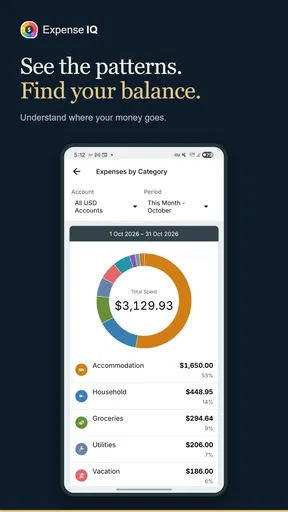
- Clear charts make spending patterns easy to understand.
- Supports multiple accounts
- cards
- and cash wallets in one place.
- Recurring transaction tools help track regular bills and income.
- Custom categories and tags allow more detailed expense organization.
- Useful backup and restore options help protect financial records.
Cons
- Some advanced features require an upgrade or may vary by device.
- The interface can feel dated compared with newer finance apps.
- Manual transaction entry may become tedious for frequent purchases.
- Cloud syncing and bank integration options are limited in some regions.
- Initial setup takes time if you have many accounts and categories.
FAQs for Expense IQ Money Manager
What is Expense IQ Money Manager used for?
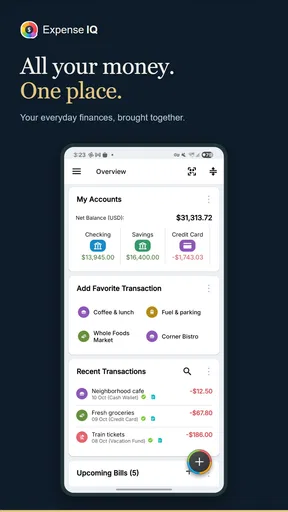
Expense IQ Money Manager is a personal finance app designed to help you organize income, expenses, bills, budgets, and savings goals in one place. After exploring its main tools, I found it especially useful for users who want a clearer view of daily spending. It can also provide reports and charts that make financial habits easier to understand over time.
Can I use Expense IQ Money Manager to track expenses from multiple accounts?
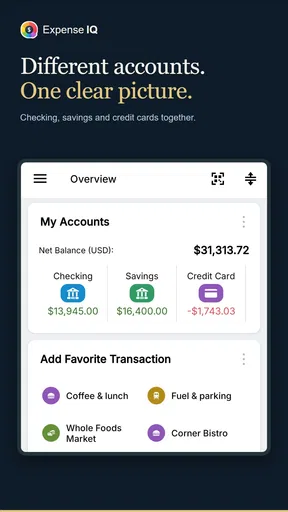
Yes, the app is designed to support tracking for different financial accounts, such as cash, bank accounts, credit cards, and savings. You can usually create separate account records and assign transactions to the appropriate one. This is helpful if you manage household finances or several payment methods, although accurate results depend on entering transactions consistently and keeping balances updated.
Does Expense IQ Money Manager automatically connect to my bank?
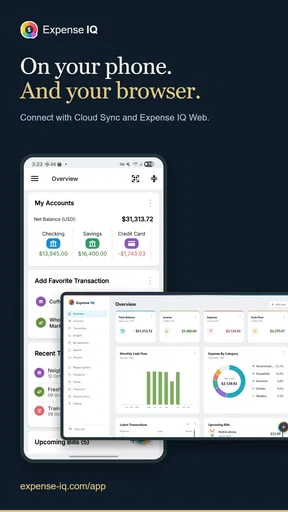
Users should check the current version and regional availability before downloading because financial connection features may vary by platform, country, or subscription plan. The app can be used manually without giving it direct access to a bank account, which may appeal to privacy-conscious users. If automatic synchronization is available, review its permissions and security information carefully first.
Is Expense IQ Money Manager free to download and use?
Expense IQ Money Manager may offer a free version with basic money-management tools, while certain advanced features can require a premium upgrade or in-app purchase. Before installing, review the store listing for the latest pricing and limitations. Free access may be enough for simple expense tracking, but frequent users could prefer premium reports, additional customization, or expanded budgeting options.
Is Expense IQ Money Manager safe for storing personal financial information?
The app can contain sensitive details about spending, accounts, and financial routines, so users should treat it as private information. Before relying on it, check the developer’s privacy policy, requested permissions, backup options, and available security features such as passcode protection. Avoid entering full banking credentials unless an official, secure connection is clearly provided and you understand how the data is handled.


